The Workstation Event Screening agent is designed to be lightweight and minimally invasive. This article summarizes the measured impact on CPU, memory, network traffic and download size, so that IT teams can plan deployment with confidence.
Design principles
The agent's architecture is built on two principles:
- Focused on file access. The agent is built around actions that happen when files are accessed. Keeping it focused keeps its overall complexity low, which makes it possible to maximize performance for the actions that matter.
- Focused on user actions. User actions tell the story of what a user has done, which is the information needed to start an investigation. The agent therefore has far fewer actions to handle, which improves performance and reduces the risk of interference with other software that also observes system activity, such as antivirus scanning.
Key results
Actual CPU, memory and network figures vary with workstation hardware and workload. Media-heavy work generates more load than text or spreadsheet work.
Download size
The total download is 67 MB during installation and configuration:
- Installation file: 33 MB
- Risk intelligence filter: 34 MB
These figures are as of September 2026
CPU
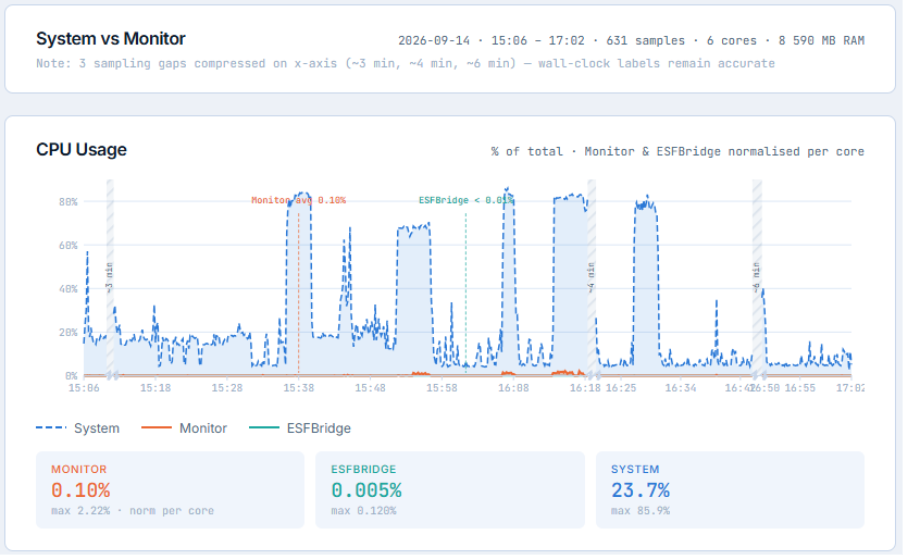
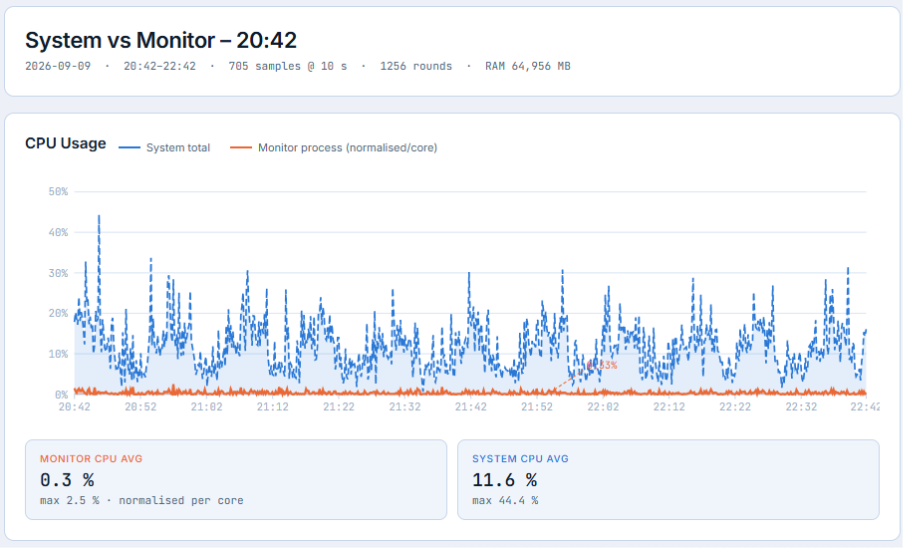
The agent's own CPU footprint is a small fraction of total system load on both platforms, staying well under 3% even at peak. Usage stayed flat over a 2-hour session with no upward drift, which indicates stable, lightweight resource usage.
| Measurement | macOS | Windows |
|---|---|---|
| Agent, average | 0.10% | 0.3% |
| Agent, peak (normalized per logical core) | 2.22% | 2.5% |
| System-wide, average | 23.7% | 11.6% |
| System-wide, peak | 85.9% | 44.4% |
| ESFBridge (companion process), average | ~0.00% | Not applicable |
| ESFBridge (companion process), peak | 0.12% | Not applicable |
On macOS, ESFBridge is a required companion component with no Windows equivalent. Its footprint is measured and reported separately.
CPU on macOS:
CPU on Windows:
Memory
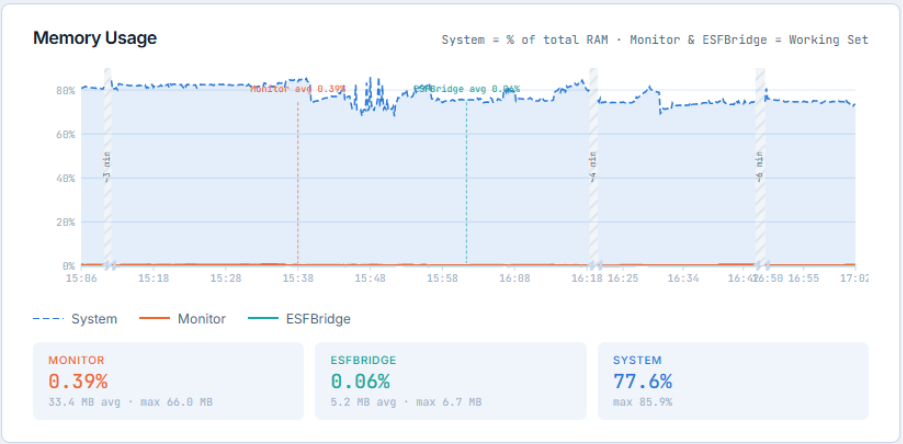
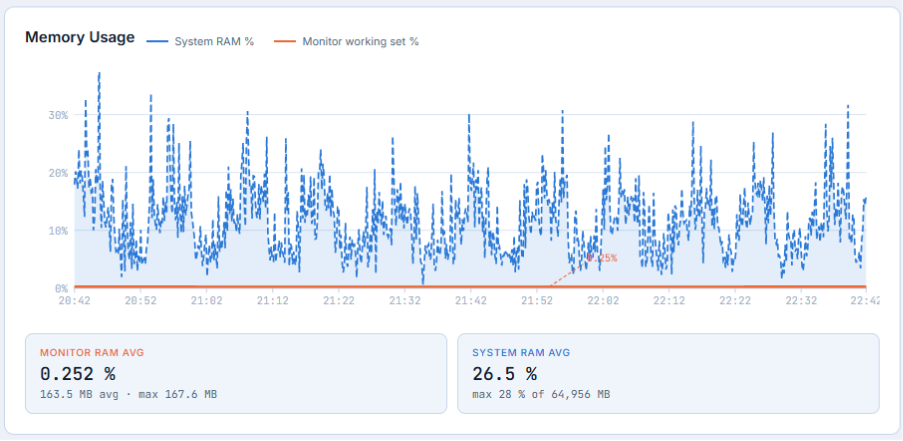
Memory usage follows the same pattern as CPU: a small, stable footprint on both platforms with no growth over time. Windows shows a somewhat larger working set than macOS, which reflects differences in how the two operating systems report and manage process memory.
| Measurement | macOS | Windows |
|---|---|---|
| Agent, average working set | 33.4 MB (0.39% of system RAM) | 163.5 MB (0.252% of system RAM) |
| Agent, peak working set | 66.0 MB (0.77%) | 167.6 MB |
| ESFBridge (companion process), average | 5.2 MB | Not applicable |
| ESFBridge (companion process), peak | 6.7 MB | Not applicable |
On Windows, system-wide RAM use averaged 26.5% of installed RAM during the test, with a peak of 28%. On macOS, system-wide RAM use runs naturally high (75 to 85% is typical baseline behavior for macOS memory management). This is not driven by the agent or ESFBridge.
Memory on macOS:
Memory on Windows:
Network traffic
The agent's network footprint is minimal. The risk intelligence filter on the device can occasionally flag a file that turns out not to be a real match. For each such case, the agent sends a short verification message to ProActive, which re-validates it before any alert is raised. Only a small number of these messages are sent per day, each just a few KB in size.
- Average: 0.23 verification messages per agent per day
- P95: 0.56 messages per day
- Each message is only a few KB, so the network load per agent is minimal
P95 means that on 95% of the test days the number of messages was at or below this value, and only the highest 5% of days exceeded it. It is included to show occasional high-traffic days that an average could hide.
Test setup
This is for reference, so that you can judge how the figures relate to your own environment.
Windows
- CPU measured via Windows Performance Counters, sampling system-wide and agent process values in a single synchronized call. The agent process value is normalized per logical core (22 cores).
- RAM measured via Win32_OperatingSystem (system) and WorkingSet64 (agent process), sampled every 10 seconds.
- Hardware: HP ZBook Firefly 16" G11, Intel Core Ultra 7 165H (1.40 GHz), 64.0 GB RAM (63.4 GB usable), 64-bit x64.
- Software: Workstation Event Screening agent, version 1.0.0.
- Test activity: a 2-hour session with simulated workstation activity (file operations, running applications, calculations).
macOS
- CPU measured via psutil (a Python monitoring script), sampling system-wide and process CPU in a single synchronized call. Process values are normalized per logical core (6 cores), since psutil reports raw per-core percentages that can exceed 100% on multi-core systems.
- Samples taken every 10 seconds.
- Hardware: MacBook (Apple A18 Pro, 6 logical cores), 8 GB RAM (8,590 MB usable), macOS ARM64.
- Software: Workstation Event Screening agent, version 1.0.0.
- Test activity: a 2-hour session with simulated workstation activity (file operations, running applications, calculations).
- Data collection note: three sampling gaps (191 s, 212 s and 356 s) occurred due to monitoring interruptions, in total about 12.7 minutes of missing data. The reported statistics are based on 631 collected samples.
Network traffic
- Performed on NetClean's internal computers under normal use, covering typical office workloads and file access patterns.
- Duration: 30 days across 16 workstations.